概述
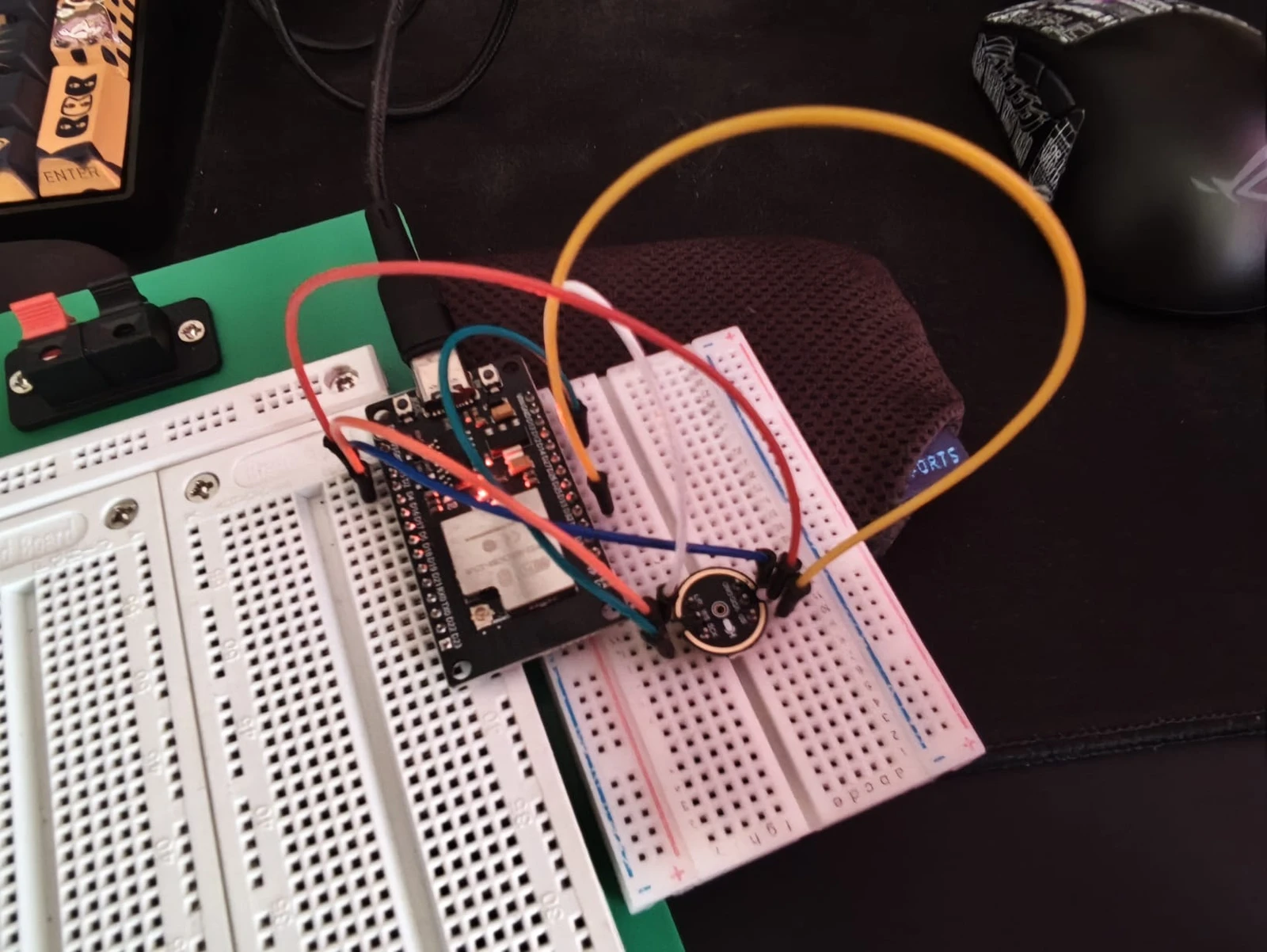
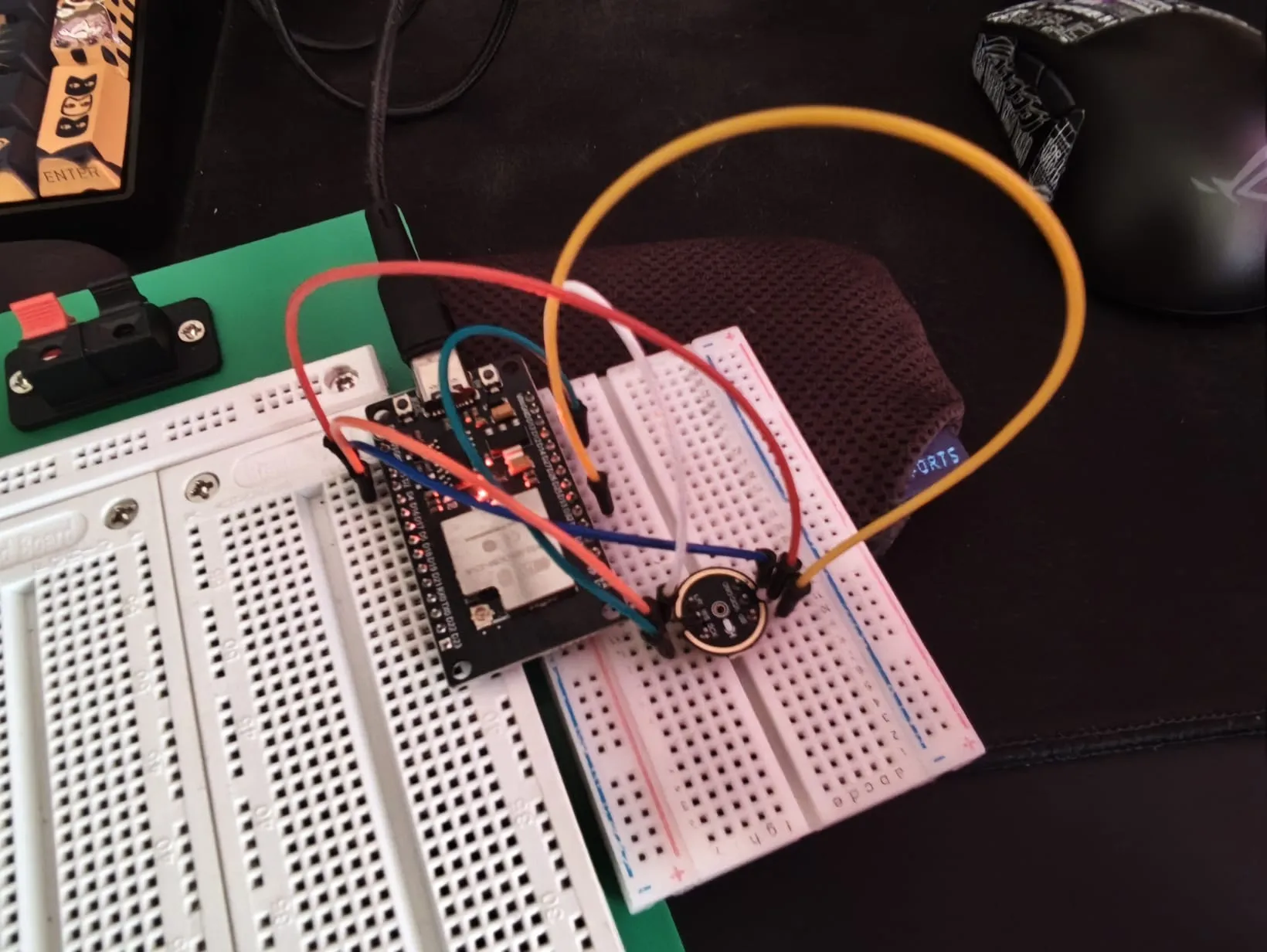
我一直想看看自己工作间的噪音到底长什么样——不只是一个数字,而是完整的频谱图。于是翻出一个 INMP441 I2S 麦克风,接上 ESP32,自己写了一套 FFT 处理管线。最终成品是一个搁在桌角的小装置:实时采集音频,跑 512 点 FFT,然后通过 WiFi 把所有数据推到浏览器仪表盘上。能看到当前分贝值、64 段对数频谱柱状图,还有 30 分钟的噪音历史曲线。说实话,盯着它看还挺上瘾的——你会慢慢发现家里到底是哪个电器最吵。
系统架构
INMP441 → I2S → ESP32 → FFT → WebSocket → 浏览器仪表盘
                                  │
                          频谱 + dB + 历史数据
引脚 — INMP441 → ESP32
| INMP441 引脚 | ESP32 引脚 | 功能 |
|---|---|---|
| VDD | 3.3V | 供电 |
| GND | GND | 接地 |
| SD | GPIO32 | I2S 串行数据 |
| WS | GPIO15 | I2S 字选(LRCLK) |
| SCK | GPIO14 | I2S 串行时钟 |
| L/R | GND | 左声道(接 GND) |
核心功能
- 实时 dB 读数,带状态指示(安静 / 正常 / 警告 / 危险)。阈值是我根据自己房间的感觉调的,不同环境可能需要调整。
- 64 段频率频谱,以动态柱状图呈现,从 20 Hz 对数分布到 20 kHz。用对数间隔很重要——人耳就是这么工作的,线性分桶会把大部分显示浪费在我们不敏感的高频段上。
- 主导频率检测——每帧找出当前最响的频率。用来识别冰箱压缩机启动那种特定频率的噪音特别好使。
- 噪音历史,30 分钟滚动缓冲区,每秒一个采样点。ESP32 在内存里保留全部 1800 个点,只把最近 600 个发给浏览器,免得 JSON 太大。
- 校准偏移,通过网页 UI 调节。INMP441 没有出厂绝对 SPL 校准,所以我拿手机 app 对着比对一下,差不多就行。
网页仪表盘
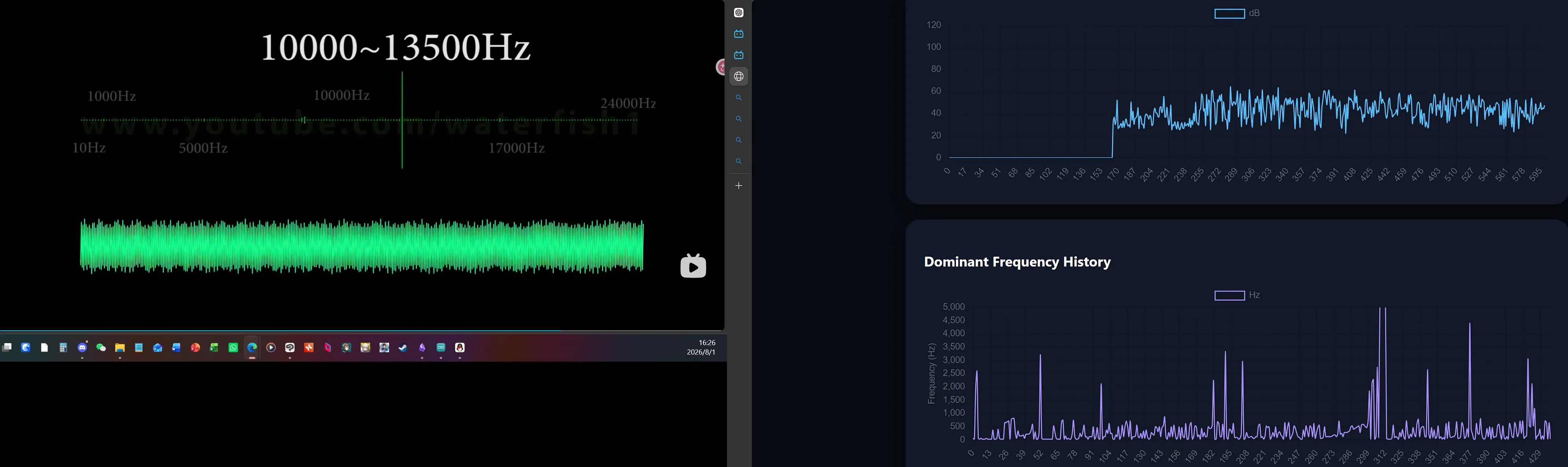
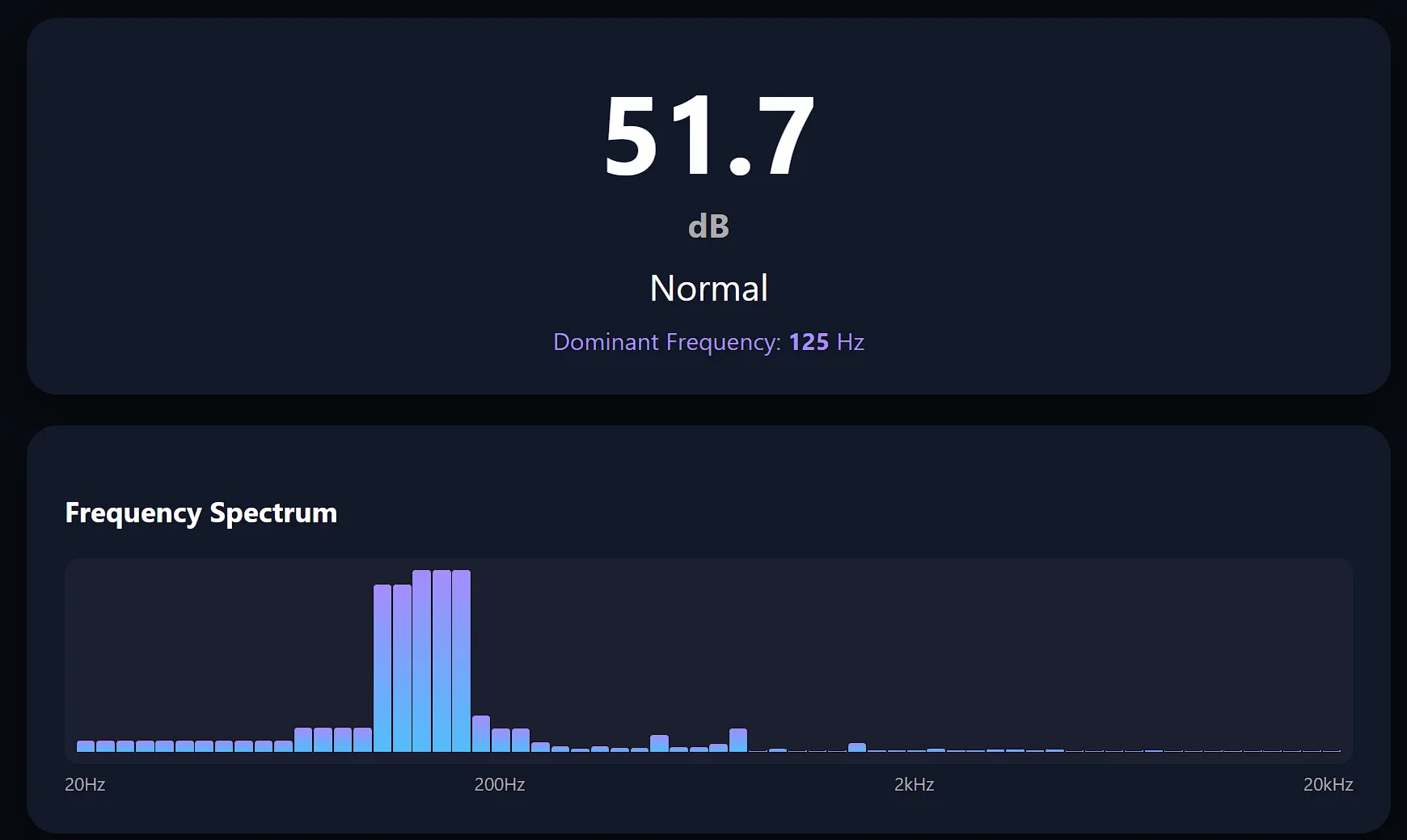
仪表盘完全在浏览器端跑,用 Chart.js 渲染。没有后端依赖——ESP32 只管提供 HTML 和 /data JSON 接口,剩下的交给 JavaScript。每秒刷新一次。踩过一个坑:这种流式数据得把 Chart.js 的动画关掉,不然浏览器跑几分钟就开始卡了。
代码结构
两个文件:
- Main.ino — I2S 驱动初始化、音频采集循环、FFT 管线(Hamming 窗、复数幅值转换、对数分桶)、WiFi 服务器、
/data和/calibrate两个 JSON 接口。 - webpage.h — 完整的 HTML/CSS/JS 仪表盘塞进一个
PROGMEM字符串。Chart.js 走 CDN 加载,数据用fetch()轮询,频谱柱状图直接用 CSS transition 的 div 元素实现。没有框架,没有构建步骤——就是能塞进 ESP32 flash 的纯 HTML。
完整代码
// ============================================
// 文件 1:Main.h / Main.ino
// ============================================

#include <WiFi.h>
#include <WebServer.h>
#include <ArduinoJson.h>
#include "driver/i2s.h"
#include <arduinoFFT.h>
#include "webpage.h"

//====================
// WiFi 配置
//====================

const char* ssid = "YOUR_WIFI_USERNAME_HERE";
const char* password = "YOUR_WIFI_PASSWORD_HERE";

WebServer server(80);

//====================
// INMP441 I2S 配置
//====================

#define I2S_WS 15
#define I2S_SD 32
#define I2S_SCK 14

#define I2S_PORT I2S_NUM_0

//====================
// FFT 配置
//====================

#define SAMPLES 512
#define SPECTRUM_BINS 64
#define SAMPLE_RATE 16000

double vReal[SAMPLES];
double vImag[SAMPLES];

ArduinoFFT<double> FFT(
  vReal,
  vImag,
  SAMPLES,
  SAMPLE_RATE
);

//====================
// 数据变量
//====================

float dbValue = 0;

float lowEnergy = 0;
float spectrum[SPECTRUM_BINS];
float dominantFreq = 0;   // 当前主导频率 (Hz)
float midEnergy = 0;
float highEnergy = 0;

// 校准偏移
float dbOffset = 0;

//====================
// 历史数据缓冲区
// 30 分钟,每秒一个采样点
//====================

#define HISTORY_SIZE 1800

float history[HISTORY_SIZE];
int historyIndex = 0;

unsigned long lastRecord = 0;

//====================
// 状态
//====================

String noiseStatus = "Quiet";

//====================
// I2S 初始化
//====================

void setupI2S() {
  i2s_config_t config = {
    .mode = (i2s_mode_t)(I2S_MODE_MASTER | I2S_MODE_RX),
    .sample_rate = SAMPLE_RATE,
    .bits_per_sample = I2S_BITS_PER_SAMPLE_32BIT,
    .channel_format = I2S_CHANNEL_FMT_ONLY_LEFT,
    .communication_format = I2S_COMM_FORMAT_STAND_I2S,
    .intr_alloc_flags = ESP_INTR_FLAG_LEVEL1,
    .dma_buf_count = 8,
    .dma_buf_len = 64,
    .use_apll = false,
    .tx_desc_auto_clear = false,
    .fixed_mclk = 0
  };

  i2s_pin_config_t pin = {
    .bck_io_num = I2S_SCK,
    .ws_io_num = I2S_WS,
    .data_out_num = I2S_PIN_NO_CHANGE,
    .data_in_num = I2S_SD
  };

  i2s_driver_install(I2S_PORT, &config, 0, NULL);
  i2s_set_pin(I2S_PORT, &pin);
  i2s_zero_dma_buffer(I2S_PORT);
}

//====================
// 读取音频采样
//====================

void readAudio() {
  int32_t buffer[SAMPLES];
  size_t bytes;

  i2s_read(I2S_PORT, buffer, sizeof(buffer), &bytes, portMAX_DELAY);

  double sum = 0;

  for (int i = 0; i < SAMPLES; i++) {
    double sample = buffer[i] >> 14;
    vReal[i] = sample;
    vImag[i] = 0;
    sum += sample * sample;
  }

  double rms = sqrt(sum / SAMPLES);
  dbValue = 20 * log10(rms);
  dbValue += dbOffset;

  if (dbValue < 0) dbValue = 0;
  if (dbValue > 120) dbValue = 120;
}

//====================
// FFT 计算
//====================

void calculateFFT() {
  FFT.windowing(FFTWindow::Hamming, FFTDirection::Forward);
  FFT.compute(FFTDirection::Forward);
  FFT.complexToMagnitude();

  // 计算对数分布的频谱
  float logMin = log10(20);          // 最低频率 20 Hz
  float logMax = log10(20000);       // 最高频率 20000 Hz
  float logStep = (logMax - logMin) / SPECTRUM_BINS;

  for (int i = 0; i < SPECTRUM_BINS; i++) {
    float freqStart = pow(10, logMin + i * logStep);
    float freqEnd   = pow(10, logMin + (i + 1) * logStep);
    int binStart = (int)(freqStart * SAMPLES / SAMPLE_RATE);
    int binEnd   = (int)(freqEnd   * SAMPLES / SAMPLE_RATE);
    binStart = constrain(binStart, 1, SAMPLES/2 - 1);
    binEnd   = constrain(binEnd,   binStart + 1, SAMPLES/2);
    if (binEnd <= binStart) binEnd = binStart + 1;

    float sum = 0;
    for (int j = binStart; j < binEnd; j++) {
      sum += vReal[j];
    }
    float avg = sum / (binEnd - binStart);
    // 映射到 0-100,除数可根据实测调整(500 是经验值)
    spectrum[i] = constrain(avg / 500, 0, 100);
  }

  // 为兼容性保留原来的三个频段值
  lowEnergy = spectrum[0];   // 简单用第一个桶近似
  midEnergy = 0;
  highEnergy = 0;
  for (int i = 0; i < SPECTRUM_BINS; i++) {
    if (i < SPECTRUM_BINS/3) midEnergy += spectrum[i];
    else highEnergy += spectrum[i];
  }
  midEnergy = constrain(midEnergy / (SPECTRUM_BINS/3), 0, 100);
  highEnergy = constrain(highEnergy / (SPECTRUM_BINS*2/3), 0, 100);
}

// 获取频谱中幅度最大的频率(基频估计)
float getDominantFrequency() {
  float maxMag = 0;
  int maxIdx = 1;  // 跳过直流分量
  // 搜索从 20Hz 到 采样率/2 的范围
  int startBin = (20 * SAMPLES) / SAMPLE_RATE;
  if (startBin < 1) startBin = 1;
  for (int i = startBin; i < SAMPLES / 2; i++) {
    if (vReal[i] > maxMag) {
      maxMag = vReal[i];
      maxIdx = i;
    }
  }
  // 转换为频率
  float freq = (maxIdx * 1.0 * SAMPLE_RATE) / SAMPLES;
  return freq;
}

//====================
// 状态更新
//====================

void updateStatus() {
  if (dbValue < 50) {
    noiseStatus = "Quiet";
  } else if (dbValue < 70) {
    noiseStatus = "Normal";
  } else if (dbValue < 85) {
    noiseStatus = "Warning";
  } else {
    noiseStatus = "Danger";
  }
}

//====================
// 历史数据记录
//====================

void saveHistory() {
  if (millis() - lastRecord > 1000) {
    history[historyIndex] = dbValue;
    historyIndex++;
    if (historyIndex >= HISTORY_SIZE) historyIndex = 0;
    lastRecord = millis();
  }
}

//============================
// JSON 数据接口
//============================

void handleData() {
  // 动态 JSON 文档,16KB 足够装下 64 个频谱值 + 600 个历史值
  DynamicJsonDocument doc(16384);

  doc["db"] = dbValue;
  doc["status"] = noiseStatus;
  doc["freq"] = dominantFreq;
  doc["low"] = lowEnergy;     // 可删,这里保留以防万一
  doc["mid"] = midEnergy;
  doc["high"] = highEnergy;

  // 发送频谱数组
  JsonArray specArr = doc.createNestedArray("spectrum");
  for (int i = 0; i < SPECTRUM_BINS; i++) {
    specArr.add(spectrum[i]);
  }

  // 发送历史数组(只取最近 600 个点,避免 JSON 太大)
  int sendCount = 600;
  int startIndex = (historyIndex - sendCount + HISTORY_SIZE) % HISTORY_SIZE;
  JsonArray arr = doc.createNestedArray("history");
  for (int i = 0; i < sendCount; i++) {
    int idx = (startIndex + i) % HISTORY_SIZE;
    arr.add(history[idx]);
  }

  String output;
  serializeJson(doc, output);
  server.send(200, "application/json", output);
}

//============================
// 校准接口
//============================

void handleCalibration() {
  if (server.hasArg("offset")) {
    dbOffset = server.arg("offset").toFloat();
  }
  server.send(200, "text/plain", "OK");
}

//============================
// 初始化
//============================

void setup() {
  Serial.begin(115200);
  delay(1000);
  Serial.println();
  Serial.println("INMP441 噪音监测仪 V2");

  // 初始化 I2S
  setupI2S();

  // 连接 WiFi
  WiFi.begin(ssid, password);
  Serial.print("正在连接 WiFi");
  while (WiFi.status() != WL_CONNECTED) {
    delay(500);
    Serial.print(".");
  }
  Serial.println();
  Serial.println("WiFi 已连接");
  Serial.print("IP 地址:");
  Serial.println(WiFi.localIP());

  // 网页
  server.on("/", []() {
    server.send(200, "text/html; charset=utf-8", webpage);
  });

  // 数据接口
  server.on("/data", handleData);

  // 校准接口
  server.on("/calibrate", handleCalibration);

  server.begin();
  Serial.println("Web 服务器已启动");
}

//============================
// 主循环
//============================

void loop() {
  server.handleClient();
  readAudio();
  calculateFFT();
  dominantFreq = getDominantFrequency();
  updateStatus();
  saveHistory();
}


// ============================================
// 文件 2:webpage.h
// ============================================

#ifndef WEBPAGE_H
#define WEBPAGE_H

#include <Arduino.h>

const char webpage[] PROGMEM = R"WEBPAGE(
<!DOCTYPE html>
<html>
<head>
  <meta charset="UTF-8">
  <meta name="viewport" content="width=device-width,initial-scale=1">
  <title>噪音监测仪</title>
  <script src="https://cdn.jsdelivr.net/npm/chart.js"></script>
  <style>
    body {
      margin: 0;
      background: #080b12;
      font-family: "Segoe UI", Arial;
      color: white;
    }
    .container {
      max-width: 900px;
      margin: auto;
      padding: 20px;
    }
    .title {
      font-size: 28px;
      font-weight: 600;
    }
    .card {
      background: #111827;
      border-radius: 20px;
      padding: 25px;
      margin-top: 20px;
      box-shadow: 0 10px 30px #0008;
    }
    .db {
      font-size: 72px;
      font-weight: 700;
      text-align: center;
    }
    .unit {
      font-size: 22px;
      color: #aaa;
    }
    .status {
      text-align: center;
      font-size: 24px;
      margin-top: 10px;
    }
    button {
      background: #2563eb;
      border: 0;
      color: white;
      padding: 10px 20px;
      border-radius: 10px;
      cursor: pointer;
    }
    input {
      width: 80px;
      padding: 10px;
      border-radius: 8px;
      border: 0;
    }
    canvas {
      width: 100%;
      max-height: 250px;
    }
  </style>
</head>
<body>
  <div class="container">
    <div class="title">环境噪音监测仪</div>

    <!-- 实时分贝与状态 -->
    <div class="card">
      <div class="db">
        <span id="db">0</span>
        <div class="unit">dB</div>
      </div>
      <div class="status" id="status">Quiet</div>
      <div style="text-align:center; margin-top:10px; color:#a78bfa;">
        主导频率:<span id="freqDisplay" style="font-weight:bold;">--</span> Hz
      </div>
    </div>

    <!-- 频谱柱状图 -->
    <div class="card">
      <h3>频率频谱</h3>
      <div id="spectrum-container" style="display:flex; align-items:flex-end; height:120px; gap:1px; background:#1a1f2e; border-radius:10px; padding:8px;">
        <!-- 柱状条由 JS 动态生成 -->
      </div>
      <div style="display:flex; justify-content:space-between; font-size:12px; color:#aaa; margin-top:5px;">
        <span>20Hz</span><span>200Hz</span><span>2kHz</span><span>20kHz</span>
      </div>
    </div>

    <!-- 分贝历史曲线 -->
    <div class="card">
      <h3>噪音历史 (dB)</h3>
      <canvas id="dbChart"></canvas>
    </div>

    <!-- 主导频率历史曲线 -->
    <div class="card">
      <h3>主导频率历史</h3>
      <canvas id="freqChart"></canvas>
    </div>

    <!-- 校准 -->
    <div class="card">
      <h3>校准</h3>
      当前偏移量:
      <input id="offset" value="0">
      <button onclick="calibrate()">保存</button>
    </div>
  </div>

  <script>
    // ========== 初始化分贝曲线 ==========
    const dbCtx = document.getElementById("dbChart").getContext("2d");
    const dbChart = new Chart(dbCtx, {
      type: "line",
      data: {
        labels: [],
        datasets: [{
          label: "dB",
          data: [],
          borderColor: "#38bdf8",
          borderWidth: 1.5,
          pointRadius: 0,         // 圆圈完全消失,线更干净
          tension: 0.3
        }]
      },
      options: {
        animation: false,
        scales: {
          y: { min: 0, max: 120 }
        }
      }
    });

    // ========== 初始化频率曲线 ==========
    const freqCtx = document.getElementById("freqChart").getContext("2d");
    const freqChart = new Chart(freqCtx, {
      type: "line",
      data: {
        labels: [],
        datasets: [{
          label: "Hz",
          data: [],
          borderColor: "#a78bfa",
          borderWidth: 1.5,
          pointRadius: 0,         // 同样无点
          tension: 0.3
        }]
      },
      options: {
        animation: false,
        scales: {
          y: {
            min: 0,
            max: 5000,            // 通常人声/音乐在这个范围,可调整
            title: { display: true, text: "频率 (Hz)" }
          }
        }
      }
    });

    // ========== 初始化频谱柱状图 ==========
    let spectrumBars = [];
    function initSpectrum(bins) {
      const container = document.getElementById("spectrum-container");
      container.innerHTML = "";
      spectrumBars = [];
      for (let i = 0; i < bins; i++) {
        const bar = document.createElement("div");
        bar.style.width = (100 / bins) + "%";
        bar.style.height = "0%";
        bar.style.background = "linear-gradient(to top, #38bdf8, #a78bfa)";
        bar.style.borderRadius = "2px 2px 0 0";
        bar.style.transition = "height 0.1s";
        container.appendChild(bar);
        spectrumBars.push(bar);
      }
    }
    setTimeout(() => initSpectrum(64), 100);

    // ========== 本地历史记录(用于频率曲线) ==========
    const MAX_HISTORY = 600;
    let freqHistory = [];   // 存放频率值

    // ========== 定时更新 ==========
    function update() {
      fetch("/data")
        .then(r => r.json())
        .then(d => {
          // 更新 dB
          document.getElementById("db").innerHTML = d.db.toFixed(1);
          document.getElementById("status").innerHTML = d.status;

          // 显示当前主导频率
          if (d.freq !== undefined) {
            document.getElementById("freqDisplay").textContent = d.freq.toFixed(0);
            // 添加到本地频率历史
            freqHistory.push(d.freq);
            if (freqHistory.length > MAX_HISTORY) {
              freqHistory.shift();  // 保持长度不超过 600
            }
            // 更新频率曲线
            freqChart.data.labels = freqHistory.map((_, i) => i);
            freqChart.data.datasets[0].data = freqHistory;
            freqChart.update();
          }

          // 更新频谱柱状图
          if (d.spectrum && d.spectrum.length > 0) {
            for (let i = 0; i < spectrumBars.length && i < d.spectrum.length; i++) {
              spectrumBars[i].style.height = d.spectrum[i] + "%";
            }
          }

          // 更新分贝历史曲线
          dbChart.data.labels = d.history.map((_, i) => i);
          dbChart.data.datasets[0].data = d.history;
          dbChart.update();
        });
    }

    // 校准函数
    function calibrate() {
      let v = document.getElementById("offset").value;
      fetch("/calibrate?offset=" + v);
    }

    setInterval(update, 1000);
  </script>
</body>
</html>
)WEBPAGE";

#endif
结果
ESP32 在单个 loop 里把采集、FFT、HTTP 服务全包了,一点问题没有。本来有点担心 WiFi 协议栈和 I2S DMA 会互相踩脚,但 ESP32 的双核架构确实靠谱,web server 和音频管线跑在同一颗核心上也相安无事。仪表盘 1 Hz 刷新,图表一直很流畅。一个 5 美元的 MCU 加一个 3 美元的麦克风能做到这种程度,挺值的。
下次想改进的地方:INMP441 的 L/R 引脚接地固定了左声道,单声道够用,但要是以后想搞立体声就得再挂一颗麦克风走独立的 I2S 总线。不过就目前来说,这东西完全满足了我的需求——把枯燥的数字变成了一幅看得见的房间声音画像。